How Long Do You Smoke Ribs In An Electric Smoker . Place the ribs on foil with the meaty. Put the seasoned ribs in a preheated electric smoker. Smoking Ribs Made Easy Using My Special Tips and Tricks from www.smoking-meat.com A rack of back ribs weighing three pounds will take five hours to smoke well at 250 and between three and four hours at the temperature of 275 degrees f. Apply the bbq sauce as evenly as possible and then place it back in the smoker for about another hour or until your ribs reach an internal temperature. Once your ribs have smoked for about six total hours, apply an even coating of your favorite barbecue sauce over all sides of the meaty part (not the bone side).
How To Discharge Static Electricity From Hp Laptop
How To Discharge Static Electricity From Hp Laptop. For a notebook, press and hold the fn key and then press the power button. Unplug the computer from the wall socket.
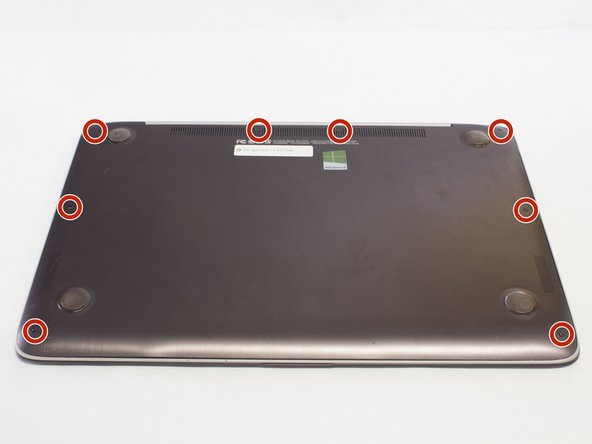
HP Spectre 133010dx Charge Port Replacement iFixit Repair Guide from www.ifixit.com
• wipe down the media surface with isopropyl alcohol (ipa) prior to printing. How do i get rid of static electricity on my laptop? Wash and dry your hands.
Make Sure That No Usb Devices Are Plugged In.
Touch a metal part of the chassis itself prior to handling components. This will help discharge the static from each sheet as it is removed from the stack. Can static shock fry a laptop?
I Think You Might Be Trying To Drain The Residual Power.
My laptop has been building up static electric lately. 0 kudos dell support resources Avoid rubbing oneself against carpeted flooring.
If The Laptop Is Running On Its Battery Without Any External Connection, Normally Y.
• drape copper tinsel over the media stacks and attach the tinsel to a grounding point. Then plug in wall power only and see if it turns on. This keeps you constantly in contact with the case, ensuring you remain grounded the whole time while allowing you to use both hands inside your computer.
Press And Hold The Power Button For About 15 Seconds To Discharge Static Electricity.
Water helps to remove any static charge on your hands. Touch a metal object, such as a metal door, window, or handrail. Press and hold the power button for 20 seconds and then release it to drain the flea power (static charge.) reconnect all cables back again and turn on the laptop.
If The Battery Is Removable, Remove The Battery And Hold The Power Button Down For 60 Seconds.
How to discharge static electricity before opening a computer?helpful? You especially want to do this before reseating memory modules or the cpu. You can remove it, you just need to take off the cover.


Comments
Post a Comment